Board games · Ideas and tactics
Save a shogi record and review one move at a time
Learn the difference between a device save, read-only move review and KIF or KIFU export, then use a move and its reply to guide your next game.
Published: · Updated:
A result tells you who won. The position before a mistake tells you something you can use next time. The shogi game lets you pause, inspect its recorded positions and return to the original game. Start with one decision and the reply that made its consequences clear.
Separate a game save from a record download
The game saves automatically and also offers Save on device and Load saved game. A device save is for continuing the game. A record download is for keeping the sequence as a file. Choose the operation that matches what you want to do later.
Changing the opponent, CPU level or side starts a new game. Preserve the record you want before changing settings, so that a practice game does not become confused with the game you meant to examine.
Pause the game and move the review cursor
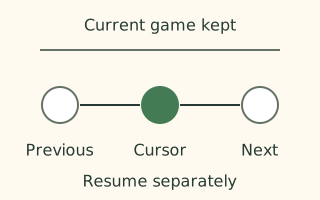
During a game, choose Pause and review move record. After it ends, choose Review move record. First, Last and the arrow buttons move through the starting position and recorded events. You can also choose an entry in the record to inspect that position directly.
The review board is read-only. Return to current position closes it, but an unfinished game remains paused. Choose Resume game when ready to continue. Displaying an earlier position does not replace the original moves or create a playable branch.
Review your move together with the reply
Suppose you advanced a rook and the opponent immediately captured it with a bishop. Move back from the capture to your rook move, then back once more. Compare the two positions: did the rook enter the bishop’s line, or did moving it remove a guard near your king? These are different questions.
Check the opponent’s pieces in hand as well. A square that looks safe against pieces already on the board may permit a dangerous silver drop. Write down one observation and turn it into a check before your next move. The record itself does not supply a best move or an evaluation of the position.
Connect USI notation to the displayed board
The settings and history area shows moves in USI notation. In the standard starting position, moving the first player’s pawn from 7七 to 7六 is 7g7f. The digit identifies the file; letters a through i identify rows from the top. Comparing the string with the board makes a compact record easier to follow.
Review offers Japanese and English display languages. KIF and KIFU downloads still contain a Japanese shogi record. Selecting English for review does not translate the KIF piece names into English.
Choose the encoding your reader expects
Download KIF (.kif · Shift_JIS) and Download KIFU (.kifu · UTF-8) export the same recorded game with different encodings. Check the receiving program’s requirements, then verify the starting position, moves and result after opening the file.
The exporter does not invent player names or elapsed times. An unfinished game, or an adjudication without an exact compatible terminal, can use 中断 with result comments. Read those comments rather than inferring the outcome from the final token alone. Export does not imply that this site can import an external KIF file.
Questions and answers
Can I play a different move from a reviewed position?
Review is read-only. Close it and choose Resume game to continue the original unfinished game.
Do KIF and KIFU contain different games?
They export the same record as Shift_JIS .kif or UTF-8 .kifu. Both contain Japanese shogi notation.
Does review tell me the best move?
No. It replays the record. Compare your decision with the reply, attacks and pieces in hand to find a useful lesson.
References
- Rules on this site
Checked: - Rules on this site
Checked: - Rules on this site
Checked: - Rules on this site
Checked: